 |
| Image by 200 Degrees from Pixabay |
Videos
A quick search of YouTube will reveal that lots of librarians are making and sharing videos for their school communities. For this post, I browsed through the offerings of four different school library accounts to see how my more experienced (and in some cases much more creative and energetic!) peers are using videos to promote their libraries, educate students and colleagues, and deliver public service announcements. After several hours of clicking from one video to another, I had gathered some new ideas, but my husband was very skeptical of my claims that I was doing homework. (Fine, I'll admit I got distracted by ONE random video of a woman reviewing ridiculously cheap wedding dresses she ordered from Wish.com, but the rest of the time I really was doing homework! I promise!)Here are some of the videos I came across and my thoughts about them.
TheNHSLibrary (Norman High School in Norman, OK)
The video I felt students would most enjoy from this YouTube channel was "Tiger Visits the Norman High Library." I think kids would find this video amusing, and I liked that it promotes both the library and school spirit.
The video I felt would be most helpful for students was "How to Use EBSCOHost," a screencast showings students how to use the database for research. Having just written last week about how useful screencasts can be in education, I was excited to see this in action.
The one that I personally liked best and would most likely try to emulate on my own is "Norman Public Schools Celebrates Your Freedom to Read." I think that kids would enjoy seeing their favorite teachers in the video, and it might generate some interest in reading one of the featured books.
theunquietlibrary (The Unquiet Library in Canton, GA)
This library channel has dozens of posts to choose from (although sadly the most recent is from six years ago... where did you go, Unquiet Librarian?). The video that I think students would most enjoy watching is "Teen Tech Week Wii Fun: Rock Band at The Unquiet Library." While not the most professional quality video on offer, it shows the kids having a definitely-not-quiet good time in the library. The boys in the video ham it up for their audience, giving the viewer permission to laugh at their antics.
There are quite a few instructional videos as well, and the one I felt would be particularly useful for students was "Mini Lesson for Ms. Salas and Students: Finding Creative Commons Images." This one shows students how to find usable photos for class through sources linked to the library's website, as well as how to provide attribution to the source. I thought this was doubly helpful because so many students aren't even aware that they NEED to find images with appropriate rights to reuse or provide proper attribution for them.
pikesvillehslibrary (Pikesville High School in Pikesville, MD)
This is another channel featuring dozens of videos, many of them student-created work. Because students usually enjoy seeing themselves and people they know on social media, I thought they would most enjoy the photo montage videos such as "Back To School Night."
The video I felt might be most useful to them is "PHS Financial Aid Workshop 2013." (Yes, 2013. This is another channel that has not seen any new posts for several years.) This video is simply a recording of a 90-minute workshop held for students and parents. (No, I did not watch the entire thing... just enough to get an idea of what it was.) While this is not the most exciting video ever posted to YouTube, it would have been extremely helpful for those who were unable to attend a meeting from 7:00-8:30 in the evening but were still interested in the information presented.
bbmsmedia (Bonnie Branch Middle School in Ellicott City, MD)
This channel definitely wins the creativity and effort award for school library videos! Their specialty is clearly making parodies of popular songs or movies to tell kids it's time to return their overdue library books. My favorite, which I think kids would also enjoy because the song parodied is still fairly popular, is "I'm The One by DJ Khaled Overdue Library Book Parody."
In addition to all of the fun parodies, however, the Bonnie Branch librarians have also made numerous instructional videos for their students. The one I thought would be most useful to students was "eResources @ BBMS." It provides an overview of the databases and other online resources which are available for students to access from home through the library's website. Since eResources aren't visible to library visitors, students often forget that they exist, so an extra reminder of what is available and how to access it is always helpful.
Bonus video that I stumbled upon on my own
I both love (because she's so stinking adorable!) and resent (because she makes me feel hopelessly inadequate) this librarian for her creativity and talent. Unfortunately, this appears to be the only library video she has made.
 |
| Image by Gerd Altmann from Pixabay |
QR Codes
QR codes, which can now be found everywhere from government PSA posters to the backs of cereal boxes, have many potential uses in the library. If the videos featured above have inspired you to make some of your own, you could use QR codes to provide quick links to your creations. For example, you might put a QR code linking to a video about how to search the OPAC above the computer workstation dedicated to this purpose. You could link book trailer videos (whether your original creations or an official trailer from the publisher) to a QR code attached the book itself or on promotional flyers around the school. Speaking of QR codes attached to books, you could also provide links to a list of readalikes for popular books. In my own library, I have used QR codes to make it easier for students to sign in - they can scan the QR code to access the Google Form that I use to track student visits to the library. I have not done anything else with QR codes yet because students aren't supposed to have their phones out at school (and it is surprisingly difficult to scan a QR code using a Chromebook webcam). However, I think that next year I will start "hiding" QR codes linked to trailers for new books in the bathroom stalls, as students inevitably sneak their phones out as soon as they have locked themselves in.
For instructional purposes, QR codes can be used to provide links to handouts or the slides themselves during classroom lessons or professional development sessions. Teacher and education consultant Tony Vincent (of learninginhand.com, which looks like a great resource for those interested in instructional technology) uses them to keep lesson closings fresh - students scan a QR code and are given a randomly generated reflection question to answer over the day's learning. He also uses QR cubes to guide group work in answering the reflection questions. (You can learn more about his use of QR codes and download his resources here.)
Bringing it all together
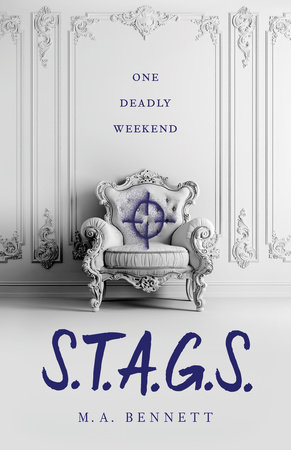
For this module, I used Animoto to make my own book trailer for S.T.A.G.S., a YA thriller by debut author M.A. Bennett. I recently read and loved this book, so I was excited for a chance to share it with my students.
 |
| Cover photo and synopsis from thepublisher's website. |
You can scan this QR code to watch my book trailer for S.T.A.G.S. (I chose a square video format instead of the default fullscreen option so that I could share it on my library's Instagram account.)

Hi Kristen! Great blog post! I also chose some of the videos that you did to highlight. I personally have not used a lot of YouTube in my classroom and/or library, but I plan to in the future! I think that the students would really be able to connect with the videos.
ReplyDeleteAwesome book trailer! I need to put it on my list to read for sure!
Good job!:)
This comment has been removed by the author.
DeleteYou recommendation for providing list of read-a-likes is brilliant! I get asked this aaaaaaaal the time and when you're busy helping 30 students it hard to always have an answer. Great tip!
ReplyDeleteGreat ideas on how to use QR codes (thanks for the warning about the difficulty with Chromebooks). I specially liked the one about hiding them in the stalls. If they have their phones.. they might as well use them to learn.
ReplyDelete